Free Weighted Gradebook Template for Excel
- Free to use
- Free to share
- Microsoft Excel
- English and French
For years my marks lived in a spreadsheet full of weighted-average formulas I was afraid to touch. This one has the formulas done for you. Name your categories, give them weights, type the marks, and the final mark works itself out.
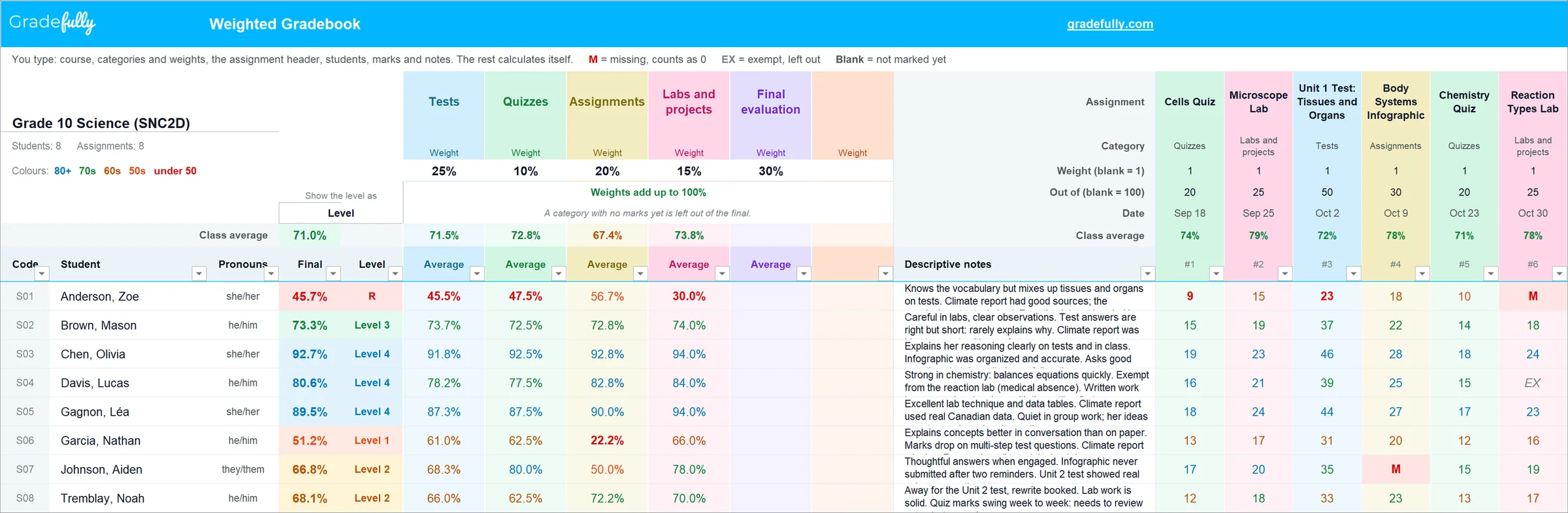
Free to use and free to share. Pass it to your department, your grade team or the new teacher down the hall.
Download the templateWant to see it filled in first? Download the example class. Teaching in French? Here is the version française.
How the weighting works
There are two kinds of weight, and the template handles both.
- Assignment weight. Inside a category, each mark counts by its weight. A report worth 2 counts twice as much as a quiz worth 1. Every mark becomes a percent first, using its out of, so 18 out of 20 and 45 out of 50 compare fairly.
- Category weight. The category averages are then combined by the category weights. Tests at 25% count two and a half times as much as quizzes at 10%.
- Empty categories wait. A category with no marks yet is left out, and the other weights scale up. In October, nobody gets a zero for a final evaluation that hasn't happened.
A worked example
Five categories, three of them with marks so far.
| Category | Weight | Average | Weight × average |
|---|---|---|---|
| Tests | 25 | 72% | 1,800 |
| Quizzes | 10 | 85% | 850 |
| Assignments | 20 | 90% | 1,800 |
| Labs and projects | 15 | No marks yet | Left out |
| Final evaluation | 30 | No marks yet | Left out |
Add the weights that count: 25 + 10 + 20 = 55. Then 4,450 ÷ 55 = 80.9%, Level 4. Once labs and the final evaluation have marks, all five count and the weights add up to 100.
Missing work, typed as M, counts as zero. Exempt work, typed as EX, is left out. A blank cell just means it isn't marked yet.
The average is where you start. Growing Success says both mathematical calculations and professional judgement inform percentage marks in Grades 7 to 12, and a report card grade gives special consideration to more recent evidence. In Grades 9 to 12, 70% of the final grade comes from work throughout the course and 30% from a final evaluation. That is why the template starts with a final evaluation worth 30%.
What's inside
- Start Here. Set-up in four steps, and what the colours mean.
- Gradebook. Six weighted categories, 40 assignments, 40 students and a column for descriptive notes.
- Learning Skills. E, G, S or N for the six learning skills and work habits, with room for what you saw.
- AI Comment Prompt. Two report card comment prompts built on Growing Success, and the steps to use them with the AI tool your board allows.
- AI Data. Your gradebook with codes instead of names, ready to paste under a prompt.
The French version follows French-language schools: seven learning skills, including Utilisation du français oral, rated E, T, S or N.
Tired of pasting prompts and data? In Gradefully, comments are drafted right beside your marks and notes. Nothing to copy, nothing to paste.
Try it free for 60 daysWant it all in one place?
This template uses the same weighting as Gradefully, the gradebook I built for my own classes. Gradefully adds what a spreadsheet can't do.
- Open it anywhere. It runs in your browser, at school or at home. No file to email yourself.
- Gradebook data in Canada. Your gradebook data is stored in Canada on Microsoft Azure, encrypted in transit and at rest. Student names are replaced with codes before anything reaches the AI.
- Tools for the rest of the day. Class analytics, a group generator, a name picker and timers.
- Comments in your voice. Gradefully drafts report card comments from your marks and notes, in your style, and learns from your edits. No prompts to paste.
- Share with your principal or a colleague. Give view-only access to a class.
Where the claims on this page come from
The documents behind the claims on this page. Page numbers are the printed page.
Links checked October 2026. If a source here does not say what we say it says, tell us at /contact/ and we will fix it.
Try Gradefully free for 60 days
No credit card required. The template stays free either way.